Broker Infra: where Terminal 4 and Terminal 5 brokers host servers, included with HFTFeed
Broker Infra shows where more than 4,000 Terminal 4 and Terminal 5 brokers host their trade servers: the city, the hosting provider, who shares infrastructure with whom, and a daily Monitor of moves. Included with every active paid HFTFeed plan: sign in with your HFTFeed account.
If your strategy sends orders through a Terminal 4 or Terminal 5 broker, the distance between your VPS and the broker's trade server is part of every order's round trip. Broker Infra tells you where that server is. It is a separate research site, published as FX Broker Geolocations, and it is included with every active paid HFTFeed plan.
What it shows
- Where every published server is. Terminal 4 and Terminal 5 brokers list their trade servers publicly. Broker Infra reads those lists, resolves every hostname and places each address in a city, with its hosting provider or network and, where the provider publishes its address ranges, the cloud region.
- Who shares infrastructure with whom. Brokers that publish the same addresses, the same ports or the same website are shown as sharing infrastructure, with the evidence next to the claim: which addresses, which ports, which website.
- The main hosting zones of the industry. A colocation shortlist ranks metro areas by the live servers hosted there, with the main provider in each.
- A Monitor of changes. New brokers, brokers no longer published, servers that moved to another city or provider, and regulation changes, written as one story per broker per daily refresh.
- Declared regulation. The regulation status each broker declares in its public broker profile, labelled as declared.
The data is refreshed once a day. The history starts from a snapshot of 18 May 2026, and the daily Monitor has run since 12 October 2026.
The industry in numbers
As of mid-October 2026, Broker Infra tracks more than 4,000 Terminal 4 and Terminal 5 brokers, running over 9,000 servers (about 6,300 of them live) on about 20,000 addresses in more than 70 countries. About half of those brokers belong to one of nearly 600 groups that share infrastructure.
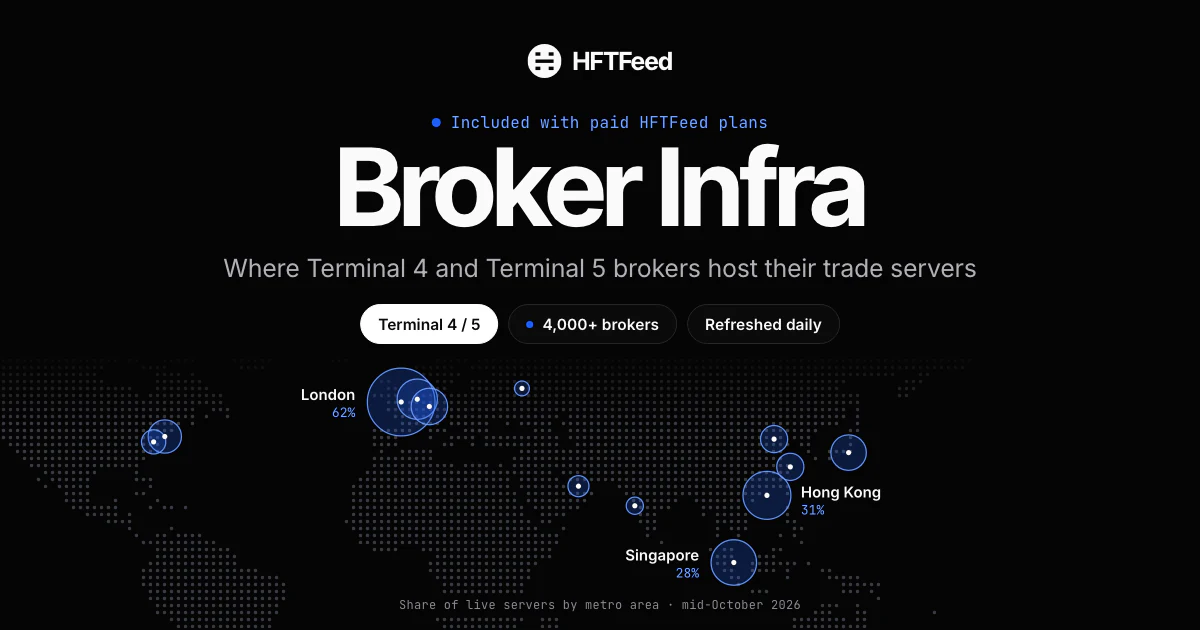
Hosting is concentrated in a few places. The top of the colocation shortlist, by share of the live servers whose location is known:
| Metro area | Share of live servers |
|---|---|
| London | 62% |
| Hong Kong | 31% |
| Singapore | 28% |
| Amsterdam | 22% |
| Frankfurt | 18% |
| Tokyo | 17% |
| New York | 15% |
The shares add up to more than 100% because a server published in two places counts in both. By provider, AWS carries about 38% of live servers, Alibaba Cloud about 22% and Microsoft Azure about 17%. The busiest single cloud region is AWS eu-west-2 in London, with about 17%.
Why it matters for your setup
Where you put your VPS sets the round trip to your broker on every order. Broker Infra tells you which city your broker's live servers are in and on which provider, so you can pick a VPS location from data rather than from a guess. The Monitor tells you when that answer changes, for example when a broker moves its live servers to another city.
HFTFeed's FIX server is in Equinix LD4, London (see how a connection works). As the FAQ on our home page puts it, co-locating in LD4/LD5 or any London facility with a cross-connect puts you under a millisecond from the feed. With more than 60% of live broker servers in the London area, one London VPS can often sit close to both your feed and your broker. Broker Infra shows you whether your broker is hosted there.
Who gets it
- Included with an active paid HFTFeed plan, monthly, yearly or lifetime, at no extra cost and for as long as the plan is active. Plans and prices are on the pricing page.
- The 24-hour trial does not include it.
- Without an HFTFeed plan, Broker Infra costs $49 per month, paid in crypto; card payments are planned. Each payment adds one month, and nothing renews automatically.
Signing in
There is no new account to create. On Broker Infra's sign-in page, choose Sign in with your HFTFeed account and use the same email and password you use on hftfeed.com. Your password goes from your browser straight to HFTFeed's sign-in service, and Broker Infra never stores it.
What it does not tell you
- Locations are city-level estimates from IP geolocation, not building addresses.
- Regulation is declared, not verified. It repeats what the broker states in its public broker profile and is not checked against any regulator's register.
- Shared infrastructure is not ownership. Brokers end up on the same addresses for many reasons, a common technology supplier among them.
- Distance is not latency. Broker Infra does not measure round-trip times. Test from a VPS before you commit to one.
- Only published servers are covered. A broker can run servers it does not list.
Open it
Sign in with your HFTFeed account on Broker Infra. If your plan does not show as active there, or you have a question about access, write to us through support or use the chat at the bottom right of every page.